


Mileage Tracker by MileageWise
4.7880.00 Reviews
App Specs
- Version
- 52
- Updated On
- License
- Free
- Downloads
- 50,000+
- Developer
- MileageWise Inc.
- Categories
- Finance
- Platform
- Android
Screenshots
 Analysis by AppCompare
Choosing a mileage tracker is less about collecting the most trip data and more about building a record you can actually keep up with. I’d ask three practical questions before installing one: will it capture drives without relying on my memory, can I distinguish work from personal travel, and will the resulting log be useful when I need to review expenses or prepare tax records? Mileage Tracker by MileageWise is aimed at people who want those pieces together rather than a general-purpose finance app with mileage tucked away as an afterthought.
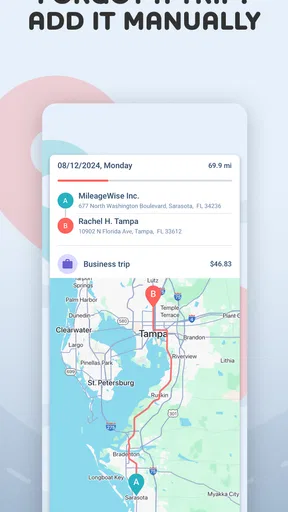
That focus matters most if you drive for work regularly. A self-employed person visiting clients, a contractor moving between job sites, or a small-business owner making supply runs can all end up with many short trips that are easy to forget. Logging each one later is possible, but it turns a routine task into a memory exercise. Automatic detection is intended to reduce that burden, while manual entry gives you another way to handle a journey that was missed or needs to be added afterward.
Decide how much tracking you really need
Not every driver needs an automatic mileage app. If you make only an occasional business trip, a simple note or spreadsheet may be enough, especially if you prefer to enter each journey yourself. That approach keeps the process under your direct control, but it depends on consistent habits. I would choose a dedicated tracker when repeated drives make manual record-keeping likely to fall behind, or when I want trip details organized in one place instead of spread across notes and calendars.
There is also a difference between tracking miles and managing every part of a vehicle’s finances. This app sits in the finance category and its focus is mileage and vehicle expenses; it is not a substitute for a complete business accounting workflow. That distinction helps set expectations. Someone who wants a broad budget planner or a full bookkeeping system may be better served by an app built around those jobs, while a driver whose central task is keeping mileage records has a more direct reason to consider this one.
MileageWise Inc. develops the app, which is free to install and has a 4.7 average from around 1,200 ratings. It has passed 10,000 installs, is rated for Everyone, and first appeared on September 7, 2020. The current version is 49.1, with Android 8.0 as the minimum operating-system requirement. These details make it straightforward to check basic fit before trying it, but the more important test is whether its tracking style suits your routine.
Where the tracker earns its place
The first useful decision is whether to let the app detect trips automatically or add them manually. Automatic detection can take routine starts and stops off your mental checklist, which is a real benefit when driving is mixed into a busy day. It is still worth checking your recorded trips rather than treating automation as a perfect witness. A quick review helps catch an overlooked journey or an entry that needs a personal or business label before a month’s travel becomes hard to reconstruct.
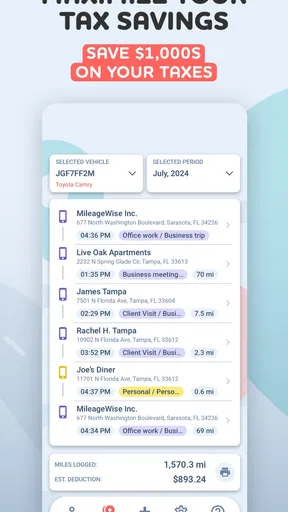
For example, picture a freelancer who drives to a client meeting, stops for personal errands, then heads to a second work appointment. The value is not just having a mileage total: it is being able to sort the journeys by purpose and attach a note while the reason is still fresh. I’d add a short, specific note such as the client or task rather than relying on memory at the end of the week. That small habit makes the record easier to interpret later without turning every drive into paperwork.
Worth Reading Before You Choose

EA SPORTS FC Mobile 26 Is a Bigger Football Game, but It Takes Time

Flipboard Shows What News Apps Must Do Beyond the Feed

Switching to Android Auto Means Rethinking Your Driving Routine

Google Calendar Makes a Crowded Week Easier to Manage

Ludo King Makes the Most of the Minutes Between Plans

Baby Panda World Brings Quick Play to Modern Phones, but Its Game Library Feels Busy
Records are only as useful as their context
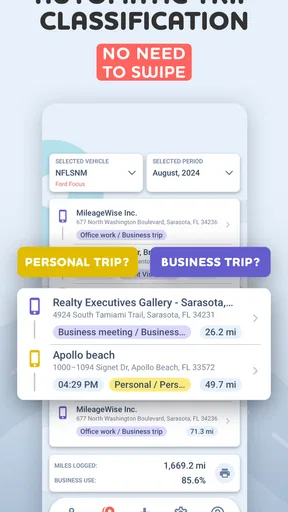
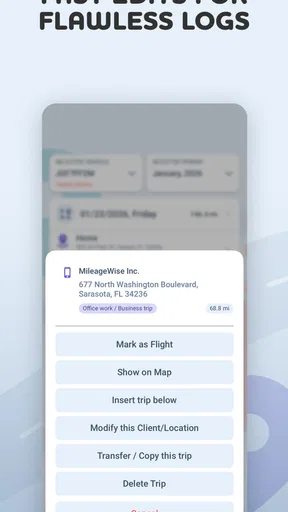
The app’s business-or-personal trip labels and notes are particularly helpful for mixed-use driving. A route by itself cannot explain why you made the trip, so recording the purpose is a practical step, not just extra detail. If your workday includes several destinations, I’d review the trip list at a natural pause—such as after parking for the evening—and correct classifications then. It is easier to remember which stop was for work while the day is still clear than when preparing records much later.
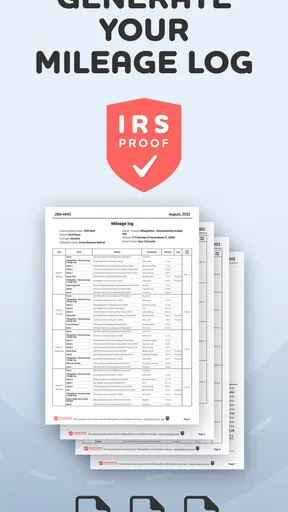
Its reports and export option give the mileage log a next step beyond the phone screen: you can prepare information to share with an accountant. The app describes these logs as IRS-compliant, but I would still treat that as a record-keeping aid rather than a guarantee that every trip qualifies for a deduction or that every tax situation is covered. Tax rules and documentation needs depend on the person and circumstances. Keep your own supporting details where appropriate and check that the exported report matches the records you intend to use.
One useful workflow is to establish a consistent review rhythm instead of waiting until tax time. At the end of a week, scan for missing trips, check business and personal labels, and add any notes that explain unusual stops. This creates a manageable checkpoint: automatic capture can do the repetitive work, while you remain responsible for the context. It also makes manual entry a practical safety net rather than a reason to assume every drive must be reconstructed from scratch.
Where other approaches can be a better fit
The usual alternatives have different trade-offs. A spreadsheet or paper log is flexible and familiar, and it can suit someone with very few work trips who does not mind entering details by hand. A general expense tracker may be preferable if mileage is only one small part of a larger system of receipts and spending. A mileage-focused app such as this one makes more sense when trip capture and trip classification are the recurring problem. I would not switch solely for the promise of automation if I rarely drive for work or already maintain accurate records another way.
Automatic tracking also asks you to trust a phone-based workflow more than a handwritten log does. That can be convenient, but it makes a quick review habit important. If you are uncomfortable checking trip records or prefer to decide manually what counts as a business journey, you may feel more in control with manual logging. Conversely, drivers who routinely forget to record short journeys are likely to get more value from automatic detection, as long as they still verify and classify what was captured.
There is a cost consideration beyond installation: the app includes in-app purchases ranging from $6.99 to $479.97 per item. I would start by checking what the free experience covers for the way I plan to use it, then compare any paid option with the time and record-keeping benefit I actually need. That is especially important for occasional drivers; paying for a larger setup may not make sense if a simple manual log already works. For frequent business travel, the relevant question is whether the added expense supports a workflow you will consistently use.
Make the switch without losing your record-keeping routine
If you already use another tracker, changing apps is not just a download decision. Before moving, I’d make sure I have access to the old trip history and any reports I may need, then choose a clear start date for the new routine. For a short overlap, compare the records you create so you can see whether automatic detection fits your driving pattern. Avoid keeping two systems indefinitely: duplicated logs create extra review work and make it harder to know which record is current.
For a first-time user, the simplest way to judge the app is to test it during an ordinary week, not only on a long or unusual drive. Check whether everyday stops are represented in a way you can understand, whether manual corrections feel manageable, and whether notes and labels help you explain the trip later. The point is not to maximize the number of entries; it is to end up with a dependable record that is easy to review and useful for your own expense process.
It is also worth thinking about driving patterns before relying on automatic capture. A person whose work involves frequent starts, stops, and mixed-purpose errands has more reason to inspect the log than someone taking a straightforward trip to one destination. In either case, I’d avoid postponing every decision until the end of the month. Classify a trip when its purpose is clear, and use a note for the occasional journey whose business context would otherwise be easy to forget.
My recommendation for the right kind of driver
In my experience, the Mileage Tracker by MileageWise is most appealing to freelancers, small-business owners, and other regular work drivers who want automatic trip detection, a way to separate personal travel, and reports they can review or export. Its combination of automatic and manual tracking gives you both convenience and a fallback, while notes help preserve the reason behind a route. Those are meaningful advantages when scattered drives are part of your workweek.
I would skip it if I needed only a broad personal-finance tool, took very few work trips, or preferred a paper or spreadsheet process I already maintained reliably. I would also avoid assuming that an automatically recorded route is a finished tax record: checking its purpose and details remains part of the job. For someone who wants a dedicated mileage workflow, though, that small review effort may be preferable to rebuilding a month of travel from memory.
Overall, this is a sensible option when the problem is not simply counting miles but keeping work-related journeys organized enough to revisit later. Start with the free app, see whether its detection and classification fit your actual routine, and weigh any in-app purchase against the value you get from that workflow. If it helps you maintain a consistent log without adding more friction than it removes, it is worth keeping in your toolkit.
Alright, let’s dive into my experience with the Mileage Tracker by MileageWise. I’ve been on the lookout for a solid mileage tracking app, and let me tell you, this one has been quite a ride! If you’re a freelancer, small business owner, or just someone who’s curious about tracking your miles, this app might just be your new best friend.
Getting Started with Mileage Tracker
First things first, installing the Mileage Tracker by MileageWise was a breeze. A quick download from the app store, and I was ready to roll. The setup process is pretty intuitive, guiding you through entering your basic info and preferences. What I loved was how the app didn’t bombard me with unnecessary questions. It’s straightforward, which is a big plus in my book.
Once you’re in, you’ll notice the clean interface. It’s not cluttered, and everything’s where you’d expect it to be. The dashboard gives you an overview of your trips, which is super helpful if you’re a visual person like me.
Features That Make It Stand Out
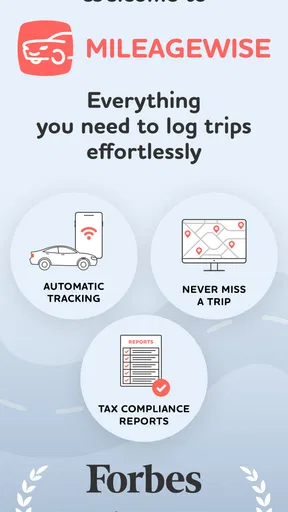
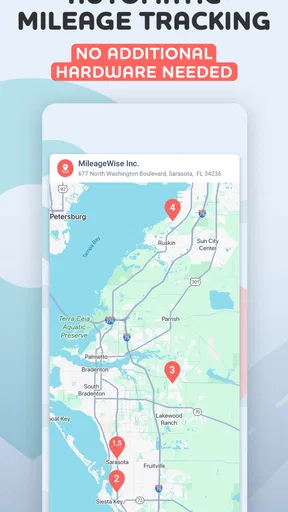
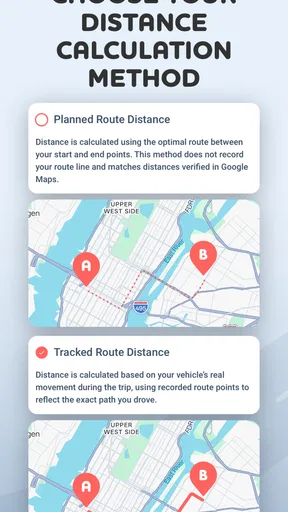
Now, let’s talk features. What really sets this app apart is its automatic trip detection. You can set it to start tracking as soon as you hit the road, no more forgetting to start the app manually. And guess what? It’s pretty accurate, too. I’ve tried a few other apps where the GPS was all over the place, but this one nails it.
Another cool feature is the IRS-compliant mileage logs. If you’ve ever been through tax season, you know how crucial this is. The app generates detailed reports that you can export directly to your accountant. It’s like having a personal assistant who’s got your back during tax time.
And for those of you who like to customize, there’s the ability to tag trips as business or personal. You can even add notes, which is handy if you want to remember why you took a particular trip.
Ease of Use and Overall Experience
Using the app daily, I found it to be quite user-friendly. The automatic tracking means I don’t have to remember to start or stop the app, which is honestly a lifesaver. The app also offers manual entry, which is a solid backup if you need to add a trip later.
Navigation within the app is smooth. I didn’t experience any lag, and switching between features is seamless. One of my favorite things? The app’s notifications are subtle and not intrusive, so you can focus on driving without distractions.
Wrapping It Up
So, what’s the final verdict on the Mileage Tracker by MileageWise? If you’re in the market for a reliable, easy-to-use mileage tracker, this app’s definitely worth checking out. It’s got all the essential features you need, wrapped in a clean interface that makes tracking mileage a no-brainer.
Whether you’re tracking miles for work, tax deductions, or just out of curiosity, this app is like having a smart co-pilot that keeps tabs on everything. So go ahead, give it a spin, and see how it fits into your routine. Happy tracking!
Pros
- User-friendly interface simplifies tracking.
- Automatic trip detection saves time.
- Customizable reports for detailed insights.
- Accurate GPS tracking ensures reliability.
- Cloud backup for easy data recovery.
Cons
- Limited free features in basic version.
- Occasional GPS connectivity issues.
- No integration with certain expense apps.
- Subscription model may be costly for some.
- Manual entry can be time-consuming.
FAQs for Mileage Tracker by MileageWise
What features does Mileage Tracker by MileageWise offer?
Mileage Tracker by MileageWise provides an array of features including automatic trip detection, manual trip logging, integration with GPS, and cloud backup. It also offers detailed reporting, allowing users to generate IRS-compliant mileage logs. The app ensures accuracy and ease for both personal and business use, making it highly versatile.
Is Mileage Tracker by MileageWise easy to use for beginners?
Yes, Mileage Tracker by MileageWise is designed with user-friendliness in mind. The intuitive interface makes it accessible for users of all levels. The app provides step-by-step guides and support, ensuring that even those new to mileage tracking can navigate its features effortlessly and effectively.
Can I use Mileage Tracker by MileageWise for both personal and business trips?
Absolutely. Mileage Tracker by MileageWise allows users to categorize trips as personal or business. This feature helps in organizing and generating separate reports for tax deductions or reimbursements, making it an ideal choice for freelancers, small business owners, and employees alike.
Does Mileage Tracker by MileageWise offer cloud backup?
Yes, the app supports cloud backup, ensuring that your data is safe and accessible from any device. This feature provides peace of mind, knowing that your mileage logs are securely stored and can be retrieved whenever needed, preventing data loss due to device issues.
Is Mileage Tracker by MileageWise compatible with both Android and iOS devices?
Mileage Tracker by MileageWise is available on both Android and iOS platforms. This cross-platform compatibility ensures that users can enjoy seamless tracking across different devices, making it convenient for individuals who switch between Android and iOS systems.


